Iorad Simulation
“Setting Document Styles in Word” is a hands-on, interactive tutorial designed to teach users how to efficiently apply and manage styles in Microsoft Word. Built using Iorad, this simulation walks learners through the process of customizing document formatting—from titles and headings to fonts and colors—using Word’s built-in Styles feature. The tutorial emphasizes practical application and visual feedback, making it ideal for users who want to streamline formatting across long documents. It’s also a strong example of how guided simulations can turn routine software tasks into engaging, skill-building
Tools Used to Create This Course:


Design Highlights:
-
Step-by-Step Guidance: Learners are guided through each action with clear instructions and visual cues, ensuring they understand both the “how” and the “why” behind each formatting choice.
-
Real-Time Interaction: Users perform tasks directly within the simulation, reinforcing learning through active participation.
-
Visual Feedback: Immediate visual changes in the document help learners see the impact of their formatting decisions.
-
Efficiency Focus: Demonstrates how updating a single style can apply changes across an entire document, saving time and ensuring consistency.
-
Accessibility: Designed for flexible use cases with intuitive navigation and clear labeling for all interactive elements.

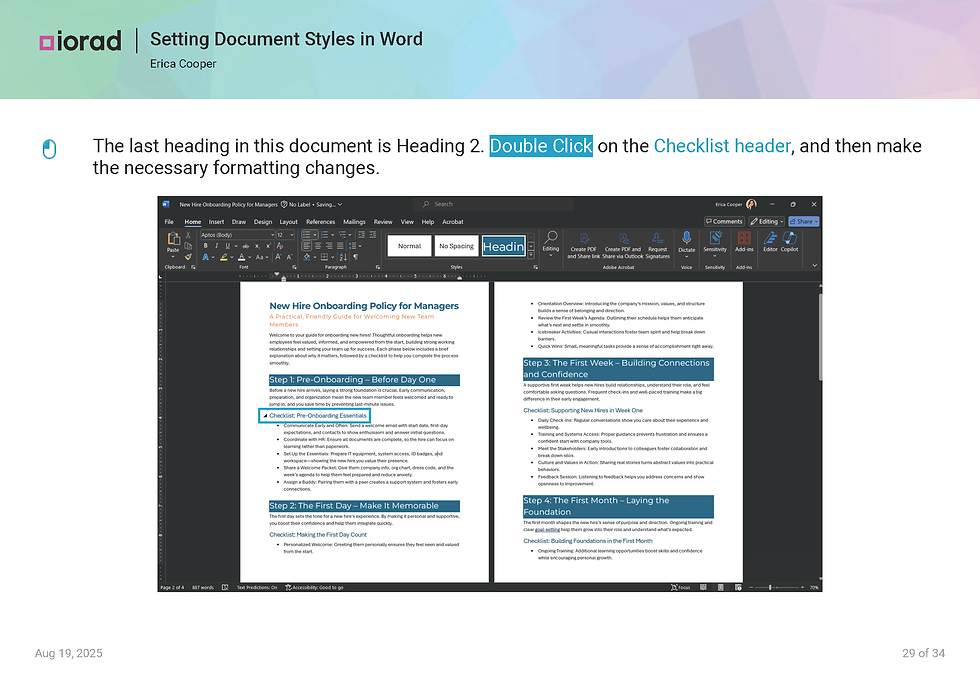

Click to enlarge or scroll down to view the whole interaction.
Audience & Learning Objectives:
This simulation is ideal for professionals, educators, and anyone who works with structured documents.
-
Understand the purpose and benefits of using Styles in Word
-
Apply and modify Title, Subtitle, Heading 1, and Heading 2 styles
-
Customize font, size, color, and alignment for different text elements
-
Update styles to reflect formatting changes across a document
-
Use the Styles pane to manage and preview formatting options
Tools Used to Create This Course:


View Another Project